Start with sound doors, a compatible lock and a clear closing routine. Choose extra protection for the contents, location and people using the store; no system removes every risk.
Start with how you'll use it and who's allowed in
List the contents, consequences of theft, times without staff and available site supervision. Assign responsibility for opening, closing and problems.
If people work inside, have access and exit addressed in the workspace design. An external lock must not trap an occupant.
| Situation | Priority to address | Organization | Limit to keep in mind |
|---|---|---|---|
| Storage opened every week | Compatible lock and checking it's in good shape at each visit | One person in charge, keys labelled, and an inventory of goods | A long stretch without a visit delays finding out about an incident |
| Workshop shared by several teams | Know who has access and check the lock | Handover register, responsible person per time slot, and departure procedure | If nobody tracks who receives the shared code, you cannot know who still has access |
| Remote site or items essential to your business | Locks, an alarm and a plan for responding to alerts | Transmission test, reachable person, and fallback solution for goods | An alert cannot prompt a response if it is not transmitted or nobody is available to receive it |
Choose a location that remains visible and practical
Keep the doors visible from normal work areas where practical, without displaying the contents unnecessarily. Test lighting at the time people lock up.
Retain room to open the doors, use the lock and carry goods. Do not rely on blocking the entrance with vehicles or materials; authorised users still need safe access.
Check the doors before adding an anti-theft device
Check door operation, hinges, locking bars and accessory mounting points, with current photos of repairs and corrosion. Test the doors on the final supports. An extra lock will not correct damaged or misaligned parts.
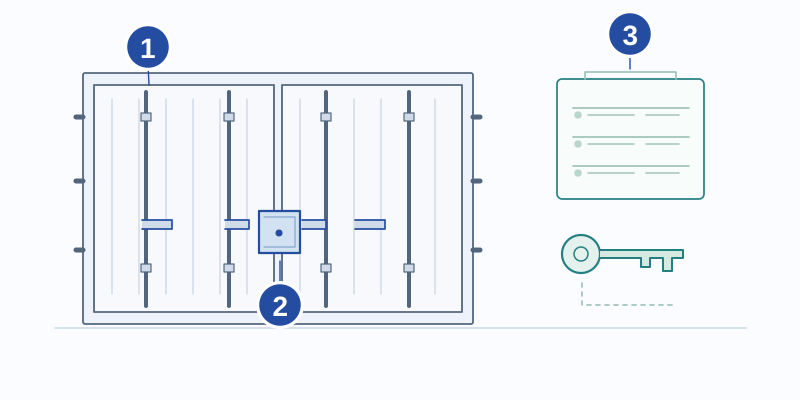
Visual reference
- Doors and locking bars
- Additional protection
- Key management
Illustrative diagram, not to scale.
Have significant corrosion, distortion or a change in door operation examined. If doors become difficult after placement, have the installation checked before forcing or modifying them.
Understand what each device protects
Identify the exact lock, protector or additional bar and check how the parts work together. A stated rating may apply only to a particular assembly and installation; it does not automatically transfer to changed parts or fixings.
- Photograph and measure the mounting points: clear openings, spacing between parts and condition of the mountings.
- Note the allowable diameter and useful clearance of the shackle from the manual; also measure the interior space of the housing.
- Check the size of the padlock body, access to the key, and whether you can remove the whole assembly when the doors are closed.
- Try handling it with gloves and under usual working conditions, without having to force the parts.
- Check the exact models in the manufacturer's documentation and keep the manual for the installed assembly.
| Device | Question to ask | Other arrangements needed |
|---|---|---|
| Padlock | Does it fit the locking mechanism and remain easy to operate? | Key management and recommended maintenance |
| Padlock protector | Does it protect the chosen padlock without hindering the doors? | Check attachment and corrosion |
| Additional bar or lock | Is it compatible with these door leaves and locking bars? | Complete test after installation |
| Detection or alarm | Does the alarm transmit reliably from this location, and can it run on its own power supply for as long as needed? | Person assigned to respond to alerts |
Prepare installation and test the assembly
Agree who supplies and installs each item. Have fixing, drilling or welding specified for that location, including protection against corrosion and water entry.
After installation, test opening, closing, fitting and removing the accessory with the keys in use. Keep the equipment reference and maintenance instructions, and report rubbing or unusual movement.
- Check that the installed models match the offer.
- Check that it closes without pressing, pulling, or lifting a door leaf in an unusual way.
- Have the future user try the assembly, not just the installer.
- Keep a photo of the closed assembly and a photo of the attachment points.
Set up a closing routine
Record authorised people and issued keys or codes. Arrange return when work ends, cover for the usual keyholder and a response to lost keys.
At closing, check that nobody remains inside, the doors and lock are engaged and any alarm is active. Record faults rather than forcing a mechanism.
Test the monitoring and respond to problems
Test alarm transmission from the final position with the doors closed. Check power, network limits and who receives and acts on an alert.
Follow maintenance instructions and inspect after unusual events. Photograph damage or a suspected break-in attempt, follow the site response procedure and have the equipment examined. Replacement parts must keep the assembly compatible.
Information to send to the supplier
Send the container reference, door photos, intended use and equipment requested. Have models, installation, testing and maintenance identified in the offer, rather than inferring included accessories from an illustration.
Checklist before putting into service
- Contents, access and closing responsibility defined.
- Doors and mounting points checked.
- Exact accessory assembly and installation agreed.
- Opening and closing tested after fitting.
- Keys, backup access and loss procedure recorded.
- Alarm transmission and recipient tested where fitted.
- Maintenance instructions and reference photos retained.
Find the right type of container
Containers to compare
Models available from our partner sellers. Indicative prices exclude VAT, transport, and unloading. The images show the models: ask for recent photos of the container you are buying.
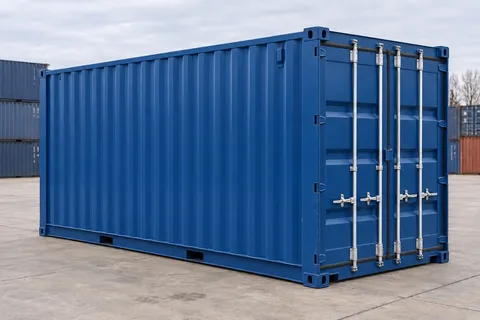
CA-20-STANDARD-NEW-BLUE
20ft Standard container · New · one trip · Blue
New · one trip / Blue
£1,390Indicative, excl. VAT
Request a quote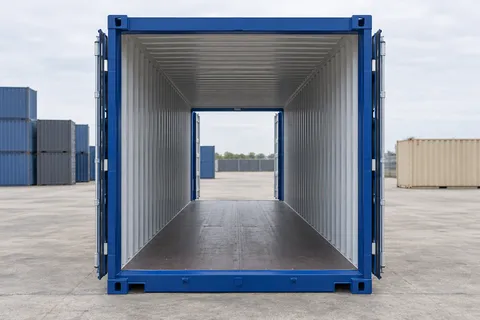
CA-20-DOUBLE-DOOR-NEW-BLUE
20ft Double Door container · New · one trip · Blue
New · one trip / Blue
£2,300Indicative, excl. VAT
Request a quote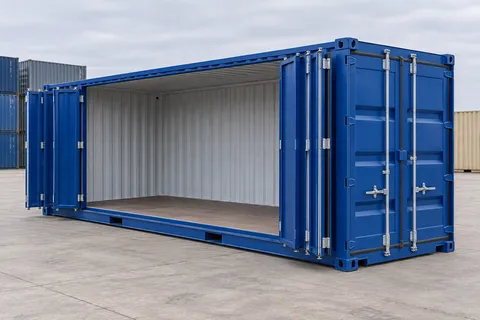
CA-20-OPEN-SIDE-NEW-BLUE
20ft Open Side container · New · one trip · Blue
New · one trip / Blue
£3,670Indicative, excl. VAT
Request a quotePractical questions
Should the padlock be changed when a key goes missing?
Follow the procedure set up for your lock and ask the supplier how to stop the lost key from being used. Depending on the equipment, have the lock replaced or reconfigured so the lost key no longer works. A missing key can still open the lock until the system has been changed.
Technical references
- ABUS — ConHasp GRANIT 215 container lock
A manufacturer’s example showing why the hasp and padlock must be compatible. This is not equipment promised with a Container Avenue listing or a rating for another assembly.